E-Kinerja BKN 2026: Login Guide, SKP & Error Fix Table
Complete guide to e-Kinerja BKN 2026: how to login, fill SKP, fix common errors, and avoid losing your performance allowance. All 5.7M civil servants affected.
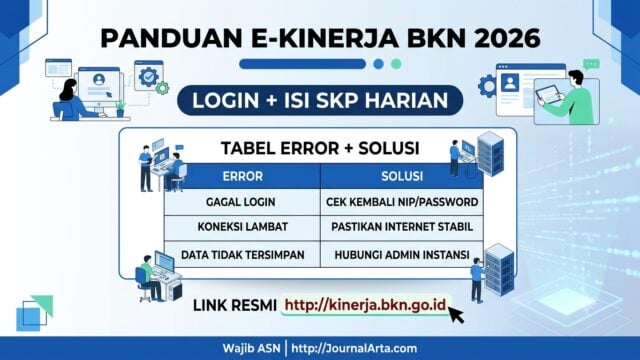
JAKARTA, JOURNALARTA.COM - Starting 2026, all civil servants — both PNS and PPPK — are required to use one official performance platform: e-Kinerja BKN at kinerja.bkn.go.id. Not optional, not phased in — mandatory and effective immediately under BKN Regulation No. 2 of 2026, signed on March 31, 2026.
What's different from previous years is that work progress must now be logged every single working day. No more bulk entries at the end of the month. The platform covers everything: Employee Performance Targets (SKP), daily activity logs, supervisor evaluations, and the calculation of Performance Allowances (Tukin) and Additional Employee Income (TPP). In total, around 5.7 million civil servants are directly affected.
How to Log In to E-Kinerja BKN 2026
There's one entry point. Open https://kinerja.bkn.go.id in a browser — Chrome (latest version) is recommended.
Username: your 18-digit NIP. Password: the same one used for your MyASN or SIASN account. If you've forgotten your password, reset it at https://mysapk.bkn.go.id by clicking "Forgot Password" and following the instructions sent to your registered email.
One critical step before your first login: make sure your MyASN data is already synced with SIASN. This is not optional. Without that sync, almost every feature in e-Kinerja will be inaccessible.
How to Fill In Your SKP and Daily Progress
Once you're logged in, the flow is fairly straightforward. Login → select the "e-Kinerja" menu → click "SKP Entry."
The first step is entering your Work Result Plan (RHK) per quarter — your target activities for the next three months. Once the SKP is approved by your supervisor, daily progress logging can begin. Every working day, civil servants must record completed activities and submit them to their supervisor.
On the supervisor's side, there's a dashboard showing four statuses: Not Started, Draft, Submitted, and Approved. Supervisors can provide feedback and scores directly from the same view.
Login Error Table and Official Solutions
Failing to log in on day one has already been a common experience for many civil servants. BKN notes that the majority of issues — around 90% — stem from MyASN data not yet synced with SIASN. Here's the full breakdown:
| Error / Issue | Common Cause | Official BKN Solution |
|---|---|---|
| Login fails (NIP/password) | Mistyped NIP or MyASN password not synced | Check 18-digit NIP. Reset password at mysapk.bkn.go.id |
| Position/work unit data empty | Data in SIASN/MyASN not updated | Login to MyASN → Edit Profile → click "Sync SIASN" (bottom-right corner) |
| Supervisor field empty/not showing | Supervisor data not entered by BKD in SIASN | Contact your agency's BKD/BKPSDM admin to update supervisor data |
| SKP menu inaccessible | Employment status not active in SIASN | Confirm PNS/PPPK active status — check with your local BKD |
| Website slow or won't load | Heavy traffic between 08:00–10:00 | Access between 06:00–07:00 or in the evening (20:00–22:00) |
| "Not an Active Civil Servant" message | NIK/NIP not matched in MyASN | Match your NIK in MyASN → go to "Data Matching" menu |
If you've never clicked "Sync SIASN" in MyASN, do that first before trying to log in to e-Kinerja. It's the one step most people skip — and the biggest source of problems.
Four Mandatory Stages You Need to Understand
The work cycle in e-Kinerja BKN 2026 runs in four sequential stages:
Planning: Enter your SKP and RHK per quarter at the start of each period. This is the foundation for all subsequent evaluations.
Execution: Log daily progress every working day. There is no tolerance for large-scale retroactive entries.
Evaluation: Supervisors provide feedback and scores based on recorded data. The process is transparent because it's data-driven — not based on impressions alone.
Follow-Up: Evaluation results are directly linked to Tukin/TPP calculations and serve as the basis for career development. If daily progress logs are empty, allowances can be withheld or reduced.
Direct Impact on Allowances and Civil Servant Careers
This is what makes the regulation serious. Daily performance logging isn't just administrative — data recorded on the national dashboard directly affects allowance disbursement. One blank day can be counted as a day not worked. Multiple blank days with no recorded justification? The consequences go much further.
BKN has built a national dashboard that can be monitored at every level, from individual agencies all the way up to the central government. That means a civil servant's daily input pattern in a remote district can be visible from Jakarta.
With 5.7 million civil servants affected, the 2026 e-Kinerja rollout stands as one of the largest bureaucratic reforms BKN has ever carried out. Three things to remember before your first working day: sync MyASN first, log in with your 18-digit NIP, then fill in daily progress without gaps. The official link is one: kinerja.bkn.go.id.