
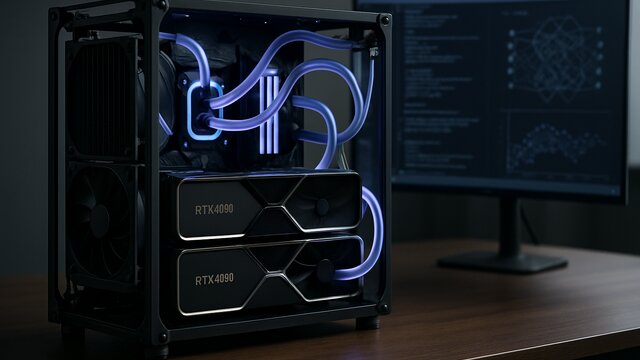
As we head into mid-2026, our reliance on artificial intelligence (AI) has reached unprecedented heights. However, the skyrocketing costs of commercial API subscriptions—such as OpenAI’s GPT-4 or Anthropic’s Claude 3.5 Sonnet—combined with growing concerns over sensitive data privacy, have prompted developers, startups, and tech enthusiasts to look for a self-hosted alternative: building their own local AI server.
With the rapid evolution of highly capable open-source large language models (LLMs) like Llama 3, DeepSeek-V2, and Mistral, local models can now match or even outperform commercial APIs for domain-specific tasks. This article provides a comprehensive blueprint—covering both hardware selection and software configuration—to help you build a powerful, cost-effective local AI server.
Why Build a Local AI Server in 2026?
Before diving into the technical specifications, let’s look at the strategic advantages of hosting your own AI infrastructure:
- Zero Subscription & API Fees: Once your server is up and running, you can perform billions of token inferences without paying a single cent in recurring API costs.
- Absolute Data Privacy: Your proprietary or personal data never leaves your local network. This is a non-negotiable requirement for sectors like healthcare, law, and finance.
- Full Customization: You have complete freedom to fine-tune open-source models using your internal datasets to achieve highly accurate, tailored outputs.
- Offline Resilience: A local AI server is accessible at any time, even during global internet outages or cloud service downtime.
1. Hardware Selection (The AI Rig Blueprint)
In AI computing, the CPU is not the star of the show. The ultimate bottleneck for inference speed and model capacity is the GPU (Graphics Processing Unit), specifically its VRAM (Video RAM) capacity.
GPU: VRAM is King
An LLM’s parameters must be fully loaded into the GPU’s VRAM to run efficiently. If your VRAM is insufficient, the model will either fail to load or be forced to offload computations to the system RAM, resulting in painfully slow inference speeds.
- NVIDIA RTX 3090 (24GB VRAM): The absolute sweet spot for budget and performance. It shares the same VRAM capacity as the RTX 4090 but is available on the used market at a fraction of the cost. Running dual RTX 3090s (totaling 48GB VRAM) allows you to run quantized Llama 3 70B models with blazing-fast speeds.
- NVIDIA RTX 4090 (24GB VRAM): The premium choice if you require maximum inference speed and superior power efficiency.
- NVIDIA RTX A6000 or A100 (40GB/80GB VRAM): Enterprise-grade options designed for massive model fine-tuning and heavy parallel workloads.
CPU & Motherboard: Mind the PCIe Lanes
If you plan to scale your server with multiple GPUs, you must choose a CPU and motherboard that support a high number of PCIe lanes. Workstation-class processors like AMD Threadripper or Intel Xeon are highly recommended, as they allow multiple GPUs to run at x8 or x16 speeds simultaneously without bandwidth bottlenecks.
RAM & Storage
- System RAM: As a rule of thumb, your system RAM should be at least double your total GPU VRAM. For a 24GB GPU setup, equip your system with at least 64GB of fast DDR5 RAM.
- Storage: Opt for a high-speed NVMe SSD (Gen 4 or Gen 5) with at least 2TB of capacity. Model weights are massive (ranging from 5GB to over 50GB per model), making fast read speeds critical for quick model loading.
Power Supply (PSU) & Cooling
Modern GPUs are incredibly power-hungry. For a dual-GPU RTX 3090/4090 setup, you will need a high-quality PSU rated at 1200W to 1600W with a Gold or Platinum efficiency rating. Ensure your PC case has excellent airflow or utilize liquid cooling loops to prevent thermal throttling under heavy computational loads.
2. Software Stack Configuration (Step-by-Step)
Once your hardware is assembled, the next step is setting up the operating system and the AI deployment stack.
Operating System: Ubuntu Server
Install **Ubuntu Server 24.04 LTS** as your base operating system. The vast majority of AI libraries, drivers, and deployment tools are developed and optimized primarily for Linux environments.
Installing NVIDIA Drivers & CUDA
Install the latest proprietary NVIDIA drivers and the CUDA Toolkit to enable your software to communicate directly with the GPU hardware:
sudo apt update
sudo apt install nvidia-driver-550 nvidia-utils-550
sudo apt install cuda-toolkit-12-4
Docker & NVIDIA Container Toolkit
Running AI applications inside Docker containers is the industry standard for preventing library conflicts. Install Docker and the NVIDIA Container Toolkit to allow containers to harness your GPU’s power:
sudo apt-get install -y nvidia-container-toolkit
sudo systemctl restart docker
Inference Engine: Ollama vs. vLLM
To serve your models, you can choose between two popular engines:
- Ollama (Easiest Setup): Perfect for personal use or small teams. You can download and run models with a single command:
ollama run llama3:70b - vLLM (High Throughput): An enterprise-grade engine optimized for high-concurrency serving. It utilizes *PagedAttention* to serve multiple users simultaneously with minimal latency.
User Interface: Open WebUI
To provide your users with a polished, ChatGPT-like interface, deploy **Open WebUI** via Docker and connect it to your Ollama or vLLM backend:
docker run -d -p 3000:8080 --gpus all --add-host=host.docker.internal:host-gateway -v open-webui:/app/backend/data --name open-webui --restart always ghcr.io/open-webui/open-webui:mainYou can now access your beautiful, self-hosted AI chat interface by navigating to http://your-server-ip:3000 in any web browser.
Cost-Benefit Analysis (CapEx vs. OpEx)
Building a local AI server requires a significant upfront capital expenditure (CapEx), typically ranging from $1,500 to $4,000 depending on your GPU configuration. However, compared to the monthly operating expenditure (OpEx) of commercial API subscriptions for a team of 15 active developers (which can easily exceed $500/month), a local server will reach its break-even point in less than 6 months.
Conclusion
In 2026, building your own local AI server is no longer just a hobbyist project—it is a highly strategic business decision. With absolute data privacy, reliable offline performance, and substantial long-term cost savings, a local AI server is one of the best investments you can make for your digital future.
📝 Leave a Comment
Comment as . Reviewed by an admin before it appears.