How to Set BMKG Weather in Palembang by District on Your Phone
Set BMKG weather in Palembang by district for more precise forecasts, weather events, UV index, air quality, and home-screen widgets.
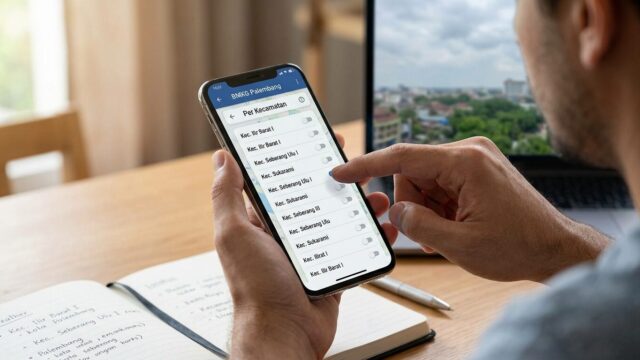
PALEMBANG, JOURNALARTA.COM — How to Set BMKG Weather in Palembang by District on Your Phone is now a practical question for residents who want forecasts that match their neighborhood, not just the whole city. The Info BMKG app lets users pick a district in Palembang so the weather shown can be far more specific, such as rain in Sako at 2:00 p.m. instead of a broad citywide warning.
That matters in daily life. A delivery rider, a street vendor, or a parent heading to school drop-off may face very different conditions across the city. One district can get soaked while another stays dry.
Set BMKG Weather by District in Palembang
The process is straightforward. Open the Info BMKG app, tap the three-dot menu, enter Settings, then choose Default Location. Type “Palembang” and pick the district you want.
Users can select areas such as Ilir Barat I, Ilir Timur II, Bukit Kecil, Sako, and other districts inside the city. Once the location is saved, the forecast updates to that area automatically.
BMKG updates the data every three hours. That schedule gives the app more timely weather readings when atmospheric conditions shift quickly across the city.
Short version: the forecast becomes local.
Why this matters for daily routines
Palembang residents do not all face the same sky. Rain can hit one part of the city hard while another area keeps clear enough for travel, errands, or outdoor work. That gap makes district-level settings more useful than a single citywide label.
For people who spend time outside, the difference is real. A courier can decide whether to wait out a shower. A parent can time a commute. Event organizers can decide whether a field setup is safe before the rain starts.
BMKG’s district-based forecast also helps reduce guesswork during unstable weather. Instead of checking a generic Palembang reading and hoping for the best, users can narrow the forecast to the area where they actually live or work.
Weather Event helps with planning
The app also has a Weather Event menu for people planning activities on a specific date and location. It is designed for situations like a festival, an outdoor meeting, or a crowd gathering near Jembatan Ampera.
Users can enter the event date and location, then see a forecast tailored to that time and place. That gives organizers a better read on whether rain could disrupt the schedule.
The feature also helps with larger public events where timing matters. A late-afternoon downpour can affect traffic, sound systems, and crowd movement in minutes.
UV index and air quality add another layer
The Info BMKG app does more than rain forecasts. It also shows UV index and air quality data, two items that matter in South Sumatra during the dry season.
UV levels in Palembang often climb high around midday. The app’s hourly UV chart can help users decide when to stay indoors or avoid long outdoor exposure. BMKG’s guidance generally points to the 10:00 a.m. to 3:00 p.m. window as the riskiest stretch for strong sun.
Air quality can turn serious as well, especially when peatland fires and haze affect South Sumatra. The app displays PM2.5 readings in real time, and its status labels make the risk easier to understand.
If the indicator shows “Hazardous,” the advice is simple: cut outdoor activity. That warning matters most for children, older adults, and people with breathing problems.
Put the BMKG widget on your screen
Users who want quicker access can place the BMKG widget on the phone home screen. That way, they do not need to open the app every time they want to check the sky.
On Android, press and hold an empty spot on the home screen, choose Widgets, find Info BMKG, then select the 4x2 size. Once it is placed, the screen can show data such as 32 degrees, cloudy skies, and 78 percent humidity at a glance.
On iPhone, users can press and hold the widget, choose Edit Stack, tap Add Widget, then search for Info BMKG. iOS 17 and later support BMKG real-time data.
The payoff is immediate. One glance is enough to tell whether a raincoat should stay in the bag. Or come out.
For Palembang residents, that small change can save time, avoid delays, and make the forecast feel a lot less generic. The app’s district-level settings, updated every three hours, are now the most useful part of the check.