
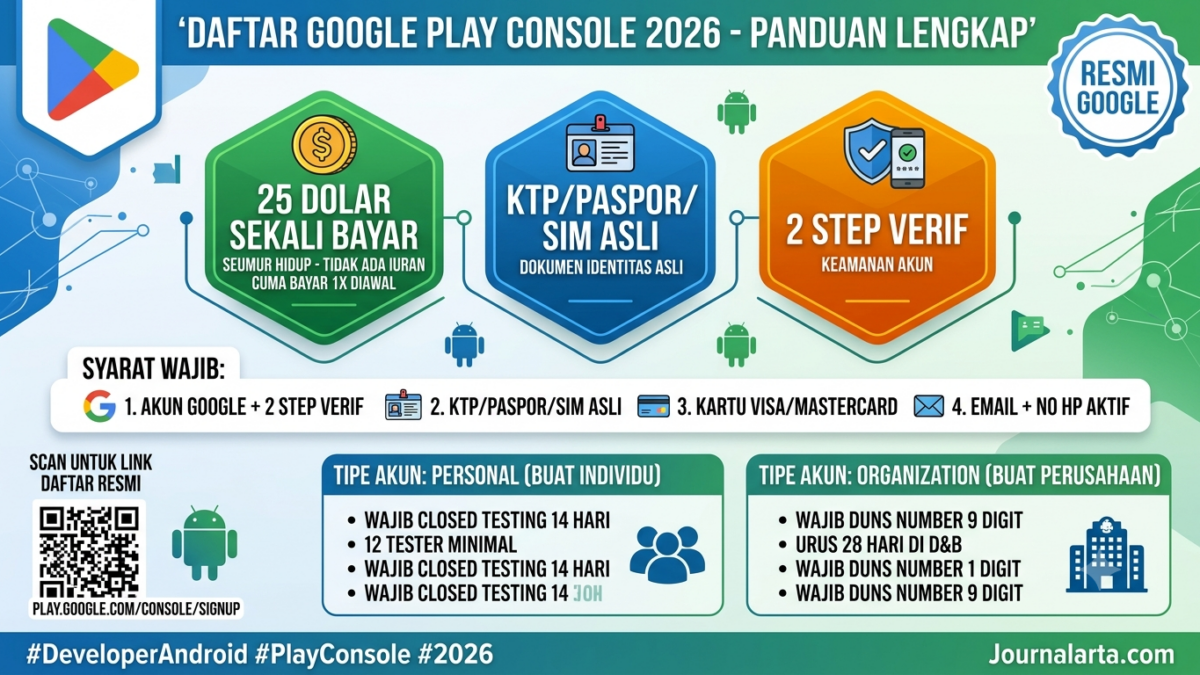
JAKARTA, JOURNALARTA.COM – Google Play Developer Console for 2026 requires tighter identity verification and 2-step verification before an account can be used to upload apps. The registration fee remains US$25 as a one-time payment, but the process now demands cleaner, matching details across identity documents, payment cards, and the developer profile.
This new setup matters for developers who want into the Play Store without getting stuck halfway through. Google has also tightened the flow for Personal accounts, including a closed testing requirement before public release, while Organization accounts are expected to prepare company documents from the start.
Google Play Developer Console account fees in 2026
Google still charges a US$25 registration fee for one developer account. The payment is a one-time charge, not an annual fee, and it is non-refundable. So if verification fails because the details do not match, the registration money will not automatically come back.
For payment, Google accepts Visa, Mastercard, and American Express debit or credit cards. Prepaid cards are usually rejected. PayPal is not used for the developer account registration process. In some countries, carrier billing is available, but for users in Indonesia, bank cards remain the most common route.
| Account type | Who it is for | Important note |
|---|---|---|
| Personal Account | Individual developers | Closed testing is required before public release |
| Organization Account | Companies, PT, CV, institutions | A DUNS Number is needed for verification |
Requirements before registering for Google Play Developer Console
Google asks for a Google account with 2-step verification enabled. Users can use Google Prompt or an authenticator app. After that, prepare official identification such as a national ID card, passport, or driver’s license. The name on the document must match the name on the card used to pay the registration fee.
Applicants also need a full address, an active phone number, and a public email address that may later appear on the Play Store. The developer name must also be chosen early. That name may differ from the ID card name, but it must be used consistently across the developer profile.
For organization accounts, there is one extra requirement that cannot be ignored: a DUNS Number. This 9-digit number from Dun & Bradstreet is used for company verification. Issuance can take around 28 days, so companies should handle it well before starting the registration process.
Steps to register and verify identity
The registration process starts on the official Google Play Console page. After logging in with a Google account, users choose an account type, agree to the Developer Distribution Agreement, and pay the US$25 fee. After that, Google will request identity verification through document uploads and, in some cases, an additional selfie.
Google says verification can be completed in a few hours up to two business days, depending on how complete the information is. If the card is rejected, the issue is usually a mismatched name, an incomplete billing address, or a card type that Google does not accept.
New rule: closed testing for Personal accounts
The biggest change is for Personal accounts. Google now requires closed testing before an app can be released publicly. Under this setup, developers must invite at least 12 testers using Gmail accounts and make sure the app is used for 14 consecutive days.
This policy is meant to reduce spam and malware apps slipping into the Play Store. Organization accounts are not subject to the same requirement, so they can move faster toward release as long as all documents and reviews pass. For solo developers, it means one extra step that must be prepared early.
Common mistakes that can cause registration to be rejected
Google is quite sensitive to mismatched information. The name on the ID card, the name on the card, and the Google account name should match exactly. Identity photos must also be clear, without blur, and all corners of the document must be visible. Using a VPN during registration should also be avoided because the system may detect unstable login locations.
The full address is checked too. In some cases, Google may send a physical letter for additional verification. That is why RT/RW details and residence information should not be filled in carelessly. Keep the payment confirmation email as well, since it can be useful if the account runs into problems later.
After the account is active, release is not immediate
An active account does not automatically mean an app can go live right away. Developers still need to create the app in Console, fill in Data Safety, content rating, and ad information, then wait for Google’s review. Based on Google’s general guidance, the review process can take three to seven business days.
For Personal accounts, the sequence is longer because closed testing comes first. If all documents, metadata, and app files are ready, the total time from registration to a live app usually ranges from one to two weeks. But if any data is missing, the process can take longer.
Google closes its guidance by stressing the security of the Android ecosystem. A spokesperson in its help materials said stricter verification is needed to maintain app quality in the Play Store. “We want to ensure users get safe apps, and developers follow a clear process from the start,” Google said in its official documentation.



📝 Leave a Comment
Comment as . Reviewed by an admin before it appears.