How to Register for Google Play Developer Console in 2026
Register for Google Play Developer Console in 2026 with the latest identity checks, fees, and testing rules explained clearly.
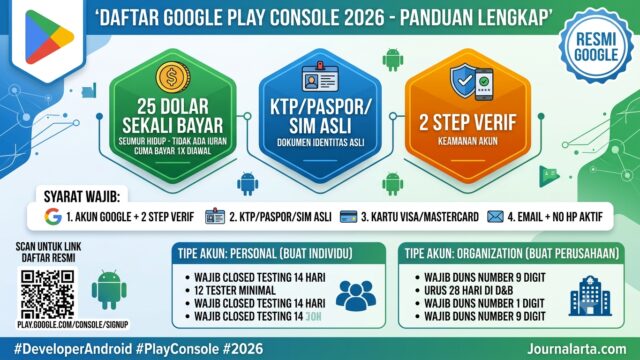
JAKARTA, JOURNALARTA.COM — How to Register for Google Play Developer Console in 2026 now comes with tighter identity checks, two-step verification, and matching details across documents, cards, and developer profiles before an app can be uploaded.
The changes matter fast for solo developers and companies alike. Google still charges a US$25 one-time registration fee, but a mismatch at any step can delay approval or stop the process entirely.
Google Play Developer Console fees in 2026
Google continues to charge US$25 for one developer account. It is a one-time fee, not an annual subscription, and Google does not refund it if verification fails.
That makes accuracy more important than ever. The payment card, the developer name, and the identity document all need to line up cleanly, or the account can get stuck before it is ever approved.
For payment, Google accepts Visa, Mastercard, and American Express debit or credit cards. Prepaid cards are usually rejected, and PayPal is not used for developer account registration. In some countries, carrier billing may appear as an option, but for Indonesia, bank cards remain the standard route.
| Account type | Who it is for | Important note |
|---|---|---|
| Personal Account | Individual developers | Closed testing is required before public release |
| Organization Account | Companies, PT, CV, institutions | A DUNS Number is needed for verification |
What Google asks before registration
Applicants must sign in with a Google account that already has two-step verification turned on. Google Prompt or an authenticator app can be used, and the company wants that layer in place before the console is opened for registration.
Users also need official identification. A national ID card, passport, or driver’s license can be used, but the name on the document must match the name on the payment card. Google has become strict about that part.
Applicants should also prepare a full address, an active phone number, and a public email address. That email may later appear on the Play Store, so it should be one developers are comfortable showing publicly.
The developer name should be chosen early. It may differ from the name on the ID card, but it has to stay consistent across the profile and the app’s public listing.
For organization accounts, one extra item stands out: the DUNS Number. This nine-digit company identifier from Dun & Bradstreet is used for business verification, and issuance can take around 28 days. Companies that wait too long can lose valuable launch time.
Step-by-step registration and identity review
Registration begins on the official Google Play Console page. After logging in, users choose an account type, agree to the Developer Distribution Agreement, and pay the US$25 fee.
Then comes verification. Google may ask for identity documents and, in some cases, a selfie. The company says review can finish in a few hours or take up to two business days, depending on how complete the information is.
If a card gets rejected, the usual problems are familiar: a mismatched name, an incomplete billing address, or a card type Google does not accept. Small mistakes create big delays.
Closed testing changes the path for Personal accounts
The biggest rule change hits Personal accounts. Google now requires closed testing before an app can be released publicly. Developers must invite at least 12 testers using Gmail accounts and keep the app in use for 14 consecutive days.
That policy is meant to reduce spam and malware on the Play Store. Google has not applied the same requirement to Organization accounts, which can move faster once their documents and reviews pass.
For independent developers, this means planning earlier. An app that is technically ready may still sit in testing for two full weeks before public release becomes possible.
Why mismatches cause delays
Google checks details closely. The name on the ID card, the card used for payment, and the Google account name should match exactly. Photos of identity documents also need to be sharp, with all corners visible.
Using a VPN during registration is not a good idea. The system may flag unstable login locations, and that can trigger extra review or rejection. Google also checks the address, and in some cases it may send a physical letter for additional verification.
That matters for applicants in Indonesia, where address formats can include RT and RW details. A sloppy entry can cause trouble later, especially if the account needs manual review. Keep the payment confirmation email too. It can help if something goes wrong after submission.
What happens after the account is approved
An active account does not mean an app can go live immediately. Developers still need to create the app in Console, fill out Data Safety, content rating, and ad information, then wait for Google’s review.
Google’s general guidance says the review can take three to seven business days. For Personal accounts, the timeline is longer because closed testing comes first. If every document, metadata field, and app file is ready, the full journey from registration to a live app usually takes one to two weeks.
That extra friction changes the stakes for developers, especially small teams building their first Android app. A launch delay can push back marketing plans, user testing, and revenue targets. And for companies, the DUNS Number clock can be the slowest part of the process.
Google says the stricter checks are meant to protect users and keep the Android ecosystem safer. In its official help materials, the company said, "We want to ensure users get safe apps, and developers follow a clear process from the start."