
JAKARTA, JOURNALARTA.COM – Google officially launched its latest artificial intelligence model, Gemini 3.5 Flash, at Google I/O 2026 with major performance upgrades. The AI model is claimed to generate output four times faster while cutting operating costs by up to half compared with competing models.
The arrival of this new technology brings a major shift for the smartphone ecosystem, especially Android users, who can now access the premium model for free without subscribing to Gemini Advanced. Users can feel the benefits immediately through lightning-fast processing right from the built-in app in their hands.
The Advantages of Google's Latest AI Model
Google's move to bring out this fast model answers the growing need for instant local and cloud AI processing. Before starting to use it, it helps to understand why this system update matters so much for daily productivity.
The main highlight is text-processing speed, with token output per second rising sharply compared with earlier versions. That speed makes tasks such as summarizing long documents, drafting emails, and analyzing lines of code feel almost seamless. The model's lower energy use on Google's servers also supports steadier service when millions of users access it at once.
Steps to Activate Gemini 3.5 Flash on Android
To use the service, you do not need third-party installation files or complicated system modifications. The integration runs entirely through Google Play Store's official channel.
Here is the complete guide to enable the feature on your Android device:
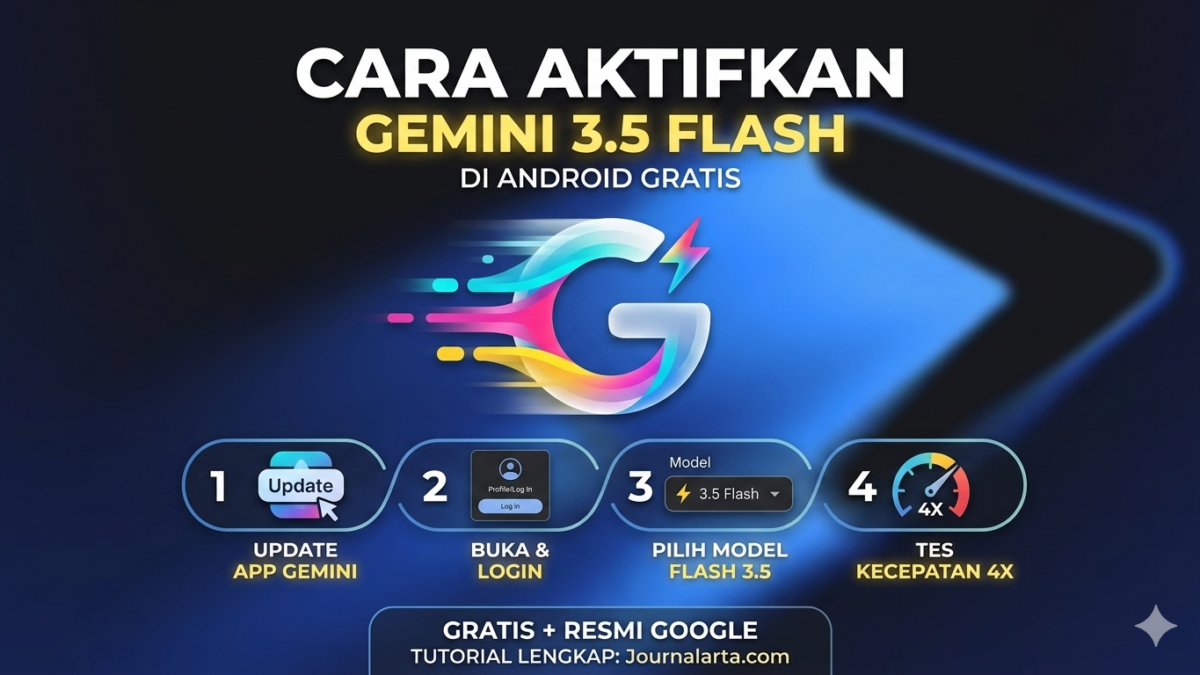
1. Update the Google Gemini App
The first step is to make sure your app is on the latest version. Open the Google Play Store app on your phone, then search for "Google Gemini" in the search bar. Tap the update button or "Update" to download the newest data package released after Google I/O 2026.
2. Launch the App and Sign In
After the update finishes, open the Gemini app. Make sure you are signed in with your active primary Google account. The service needs stable account sync so the latest model configuration can load properly.
3. Switch the Model to Version 3.5 Flash
On the main chat page, look at the top of the screen where the active model indicator appears. Tap the model selection menu, which usually shows "Gemini 1.5 Pro" or another standard version. From the list that appears, tap "Gemini 3.5 Flash" to activate it instantly.
4. Test the Processing Speed
To make sure the new system is working, try testing its performance with a complex prompt. For example, type, "Write a 500-word summary of global technology developments." You should see the response generated much faster, with very little waiting time.
Direct Integration Through Google Search
Google has also embedded the new model directly into its search engine, without requiring users to open a dedicated app. When you type a complex question into the Google Chrome search bar, the AI system automatically formulates an answer through the AI Overview panel.
The transition happens automatically in the background. If the system detects that your query needs a quick and concise response, the search algorithm will immediately call on the Flash model database to generate an answer on your first search page.
Fixing Cases Where the Feature Does Not Appear
Because new technology is often rolled out gradually by region, some users may not yet see the model update option on their phones. The first step to try is clearing the app's temporary memory.
Go to your phone's Settings menu, choose Apps, then find Gemini. In the storage menu, tap "Clear Cache" and then force close the app before reopening it.
If the option still does not appear, you can join the public beta program through the Google Play Store page to get earlier access to the update queue.


📝 Leave a Comment
Comment as . Reviewed by an admin before it appears.