Android Brings Vibe Coding to Custom Pixel Widgets
Google’s Create My Widget feature lets Pixel owners use Gemini to make custom home-screen widgets. The beta can display countdowns and sports information or launch Gemini prompts, though a test of a live bus-arrival widget returned a schedule-based response instead.
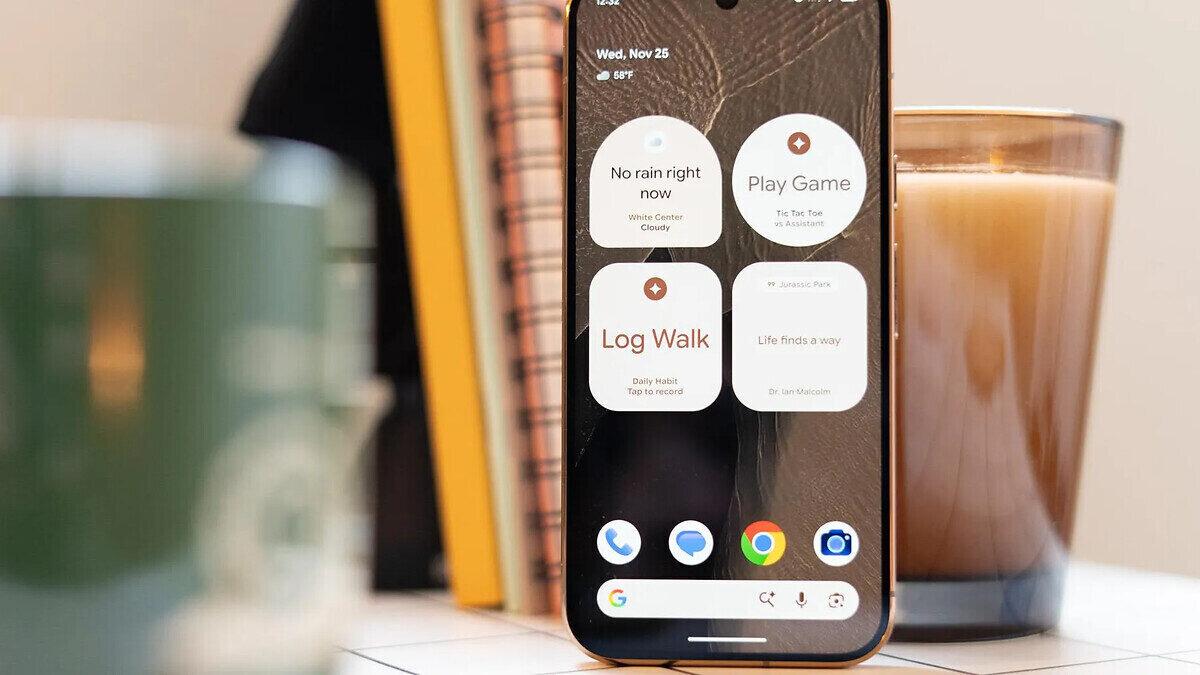
Google’s Create My Widget beta brings vibe coding to Pixel phones, letting users ask Gemini to build custom home-screen widgets. The feature can display some information directly or launch a Gemini prompt. A test of a live bus-arrival widget, however, produced a schedule-based response instead.
The beta has begun rolling out to Pixel phones. Google announced Create My Widget at I/O and included it in Android’s Gemini Intelligence features.
Widgets can put information on a phone’s home screen, where users can see it without opening an app. Create My Widget lets users describe what they want Gemini to make.
Some Widgets Launch Gemini Prompts
On a Pixel 11 Pro, one test produced a widget that showed a different Jurassic Park quote every hour. It took about 20 seconds to create. Tapping it opened a thread in r/MovieQuotes.
Another widget displayed a rain message when it was raining and a different message when it was not. The creation interface also suggests uses such as habit tracking and recipe inspiration.
A request for a widget to log a week of walks produced a different result. The widget launched Gemini to add a walk to the user’s calendar when tapped.
Gemini also suggested creating a checklist to mark off walks on each day of the week. That differed from the visual streak tracker the user had hoped to create.
Live Bus Arrivals Fell Short
A request for real-time arrivals at a specified bus stop produced a Bus Arrivals tile. Tapping it prompted Gemini to search for arrival times, but its response discussed service frequency and expected arrivals based on the schedule.
The result did not provide the glanceable list of live arrivals the user wanted. Opening the widget brought up Gemini rather than showing that list on the home screen.
Other supported designs include countdowns to holidays or calendar events. A sports widget can show a team’s recent score and upcoming game time.
More open-ended requests can draw on Google search results or ask Gemini to work out an answer. One example is a widget that suggests a different three-ingredient cocktail recipe each day.
 Take the quizWhat Kind of Holiday Spender Are You? Take the Black Friday QuizStart →
- 1Sandisk shares jump nearly 16% to $85.36 after Kioxia-Nvidia test

- 2Tesla shares jump 4.86% to $398.60 after German robotics filing

- 3Nasdaq Composite rises nearly 2% as tech rebound eases AI fears

- 4Bears’ Jeffery Simmons Says Lions Were ‘Crying’ After Win

- 5Nvidia shares edge higher but lag S&P 500 as credit review clouds outlook

 Business · Macro & PolicyEmergency Fund Calculator: How Much Should You Save?
 LifestylePeople Who Type Long Texts and Delete Them Often Share These 5 Traits, Psychologists Say
 Business · Macro & PolicyFull Retirement Age Chart: Social Security Ages by Birth Year Explained
 Lifestyle · Food & HealthWhat Is a GLP-1 Receptor Agonist? How It Works, Uses and Side Effects