
JAKARTA, JOURNALARTA.COM – If you’ve spent around Rp3 million on a phone with a 144Hz display but games still feel ordinary and only run at 60FPS, don’t rush to feel disappointed.
The advantage of a high refresh rate screen only becomes obvious when the game itself can push high frame rates. Scrolling through social media already feels smoother, but the real payoff shows up when you play.
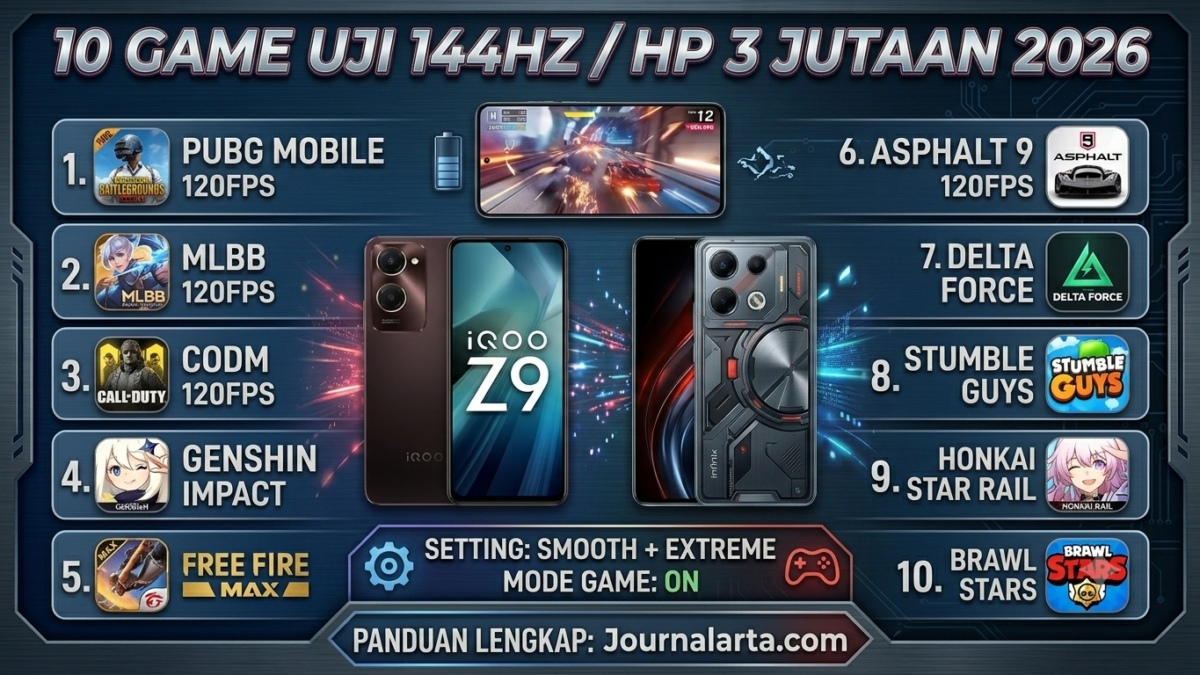
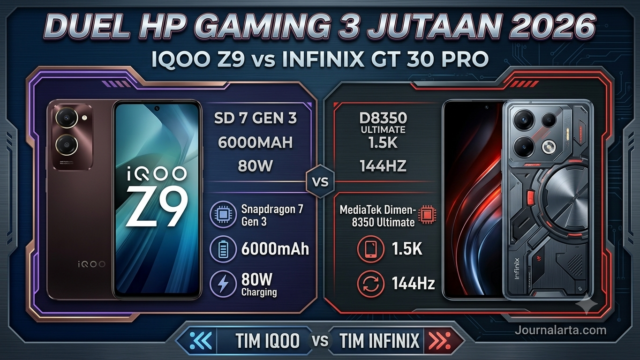
Here’s a complete guide to turning it on, plus a list of 10 of the best games that can test a 144Hz screen on midrange phones such as the iQOO Z9 or Infinix GT 30 Pro.
How to Enable 144Hz Refresh Rate Before Playing
Before you jump into a game, make sure the device settings are correct so it doesn’t stay locked at 60FPS:
1. Through System Settings: Open Settings > Display > Screen Refresh Rate, then select 120Hz, 144Hz, or Auto.
2. Turn On a Performance Mode: Open Game Mode, Game Turbo, or GT Mode, then choose the High Performance profile. This keeps the system from lowering performance automatically.
3. Check the System Version: On phones running Android 15, high frame rate support requires game developers to update their apps so they can read the special API commands. If the game hasn’t been updated, a 144Hz screen can still run at 60FPS.
Important Note: The system can automatically drop to 60Hz if the phone gets too hot or battery drops below 20% to save power.
10 Best Games to Test 144Hz Screens on 3 Million-Rupiah Phones in 2026
Here are the games that are best suited to testing the smoothness and responsiveness of a high-tech display:
1. PUBG Mobile – The FPS King with 120/144 FPS Support
- Frame Rate Support: Smooth + Extreme mode = 120FPS.
- Why It Fits: Aiming, scouting, and turning the camera feel much smoother than at 60FPS. Enemy movement is easier to see and less blurry.
Settings on 3 Million-Rupiah Phones:
- iQOO Z9 (Snapdragon 7 Gen 3): Stable at 90FPS.
- Infinix GT 30 Pro (Dimensity 8350): Can reach 120FPS with smooth graphics settings.
- Tip: Turn on Game Turbo and use training mode to test FPS stability.
2. Mobile Legends: Bang Bang – The Most Responsive MOBA
- Frame Rate Support: High mode up to 120FPS.
- Why It Fits: Skill casting, repositioning, and retreating to base feel very smooth. There’s no stutter during big team fights.
- Settings on 3 Million-Rupiah Phones: Already supports 120FPS smoothly in the midrange class. On the Infinix GT 30 Pro, physical trigger buttons make the experience even better.
3. Call of Duty: Mobile – Competitive FPS
- Frame Rate Support: Maximum/High options up to 120FPS.
- Why It Fits: Shooter games demand fast reactions. On a 144Hz screen, it’s easier to track running enemies and aim accurately.
- Settings on 3 Million-Rupiah Phones: Both Snapdragon 7 Gen 3 and Dimensity 8350 can run it stably at 60FPS to 90FPS.
4. Genshin Impact – A Stability and Endurance Test
- Frame Rate Support: Up to 60FPS on mobile devices.
- Why It Fits: Even though it doesn’t support 120FPS, elemental attack animations, map transitions, and camera movement feel much smoother on a 144Hz screen than on a standard display. It’s also good for testing the phone’s cooling system.
Settings on 3 Million-Rupiah Phones:
- Infinix GT 30 Pro: Can hold 60FPS on high graphics settings.
- iQOO Z9: Needs slightly lower graphics settings to avoid performance drops when temperatures rise.
5. Honkai: Star Rail – Smooth, Cinematic Visuals
- Frame Rate Support: Up to 60FPS.
- Why It Fits: Even as a turn-based game, the effects during ultimate attacks and transitions between combat scenes look beautiful and flow smoothly on a high-capability display.
6. Free Fire MAX – Light but Very Responsive
- Frame Rate Support: Up to 120FPS on supported devices.
- Why It Fits: As a lightweight game, 120FPS can be maintained consistently. It’s great for testing touch sensitivity and trigger-button response on the Infinix GT 30 Pro.
7. Asphalt 9: Legends – Racing Without Blur
- Frame Rate Support: Up to 120FPS.
- Why It Fits: When drifting or using boost, the image doesn’t look blurry or smeared. Paired with the Infinix GT 30 Pro’s 1.5K display, the visuals look even more impressive.
8. Delta Force – A New Tactical FPS
- Frame Rate Support: Uses High Frame Rate technology.
- Why It Fits: The Infinix GT 30 Pro has already received official certification to run 10 high-performance games, including Delta Force. Movement and reaction timing in tactical combat become more precise.
9. Stumble Guys – A Test of Touch Responsiveness
- Frame Rate Support: Above 120FPS.
- Why It Fits: This game demands precise jumping and movement, making it ideal for testing touch sampling rates up to 2160Hz. Every finger tap is translated into motion instantly, with no lag.
10. Brawl Stars – Fast and Accurate Action
- Frame Rate Support: Up to 120FPS.
- Why It Fits: This high-speed game requires accurate aiming. On a 144Hz screen, movement and shooting feel smoother, making it easier to organize an attack strategy.
Tips to Keep Frame Rate Stable at 120–144 FPS
To make sure the numbers in the settings menu actually translate into smoother gameplay, do the following:
1. Check In-Game Settings: Open Graphics > Frame Rate, then choose the highest option such as Extreme, Ultra, or 120FPS. If that option doesn’t exist, the game likely doesn’t support it yet.
2. Turn Off Power Saving Mode: Make sure battery saver is disabled. If battery drops below 20%, the system usually lowers performance to 60FPS automatically.
3. Use an External Cooler: For demanding games like Genshin Impact, device temperatures can rise quickly. A magnetic cooling fan priced around Rp100,000 can already help keep temperatures stable and prevent sudden FPS drops.
4. Update the System and Apps: Make sure the operating system and game are updated to the latest version so they remain compatible with your screen technology.
5. Monitor It Live: Download a performance app such as FPS Meter to check in real time whether the frame rate is running as expected.
Closing
Those are the best games you can use to test and maximize a 144Hz screen on a budget 3 million-rupiah phone. The most noticeable difference usually comes from PUBG Mobile and Mobile Legends.
Have you tried any of the games above? What FPS did you get? Share your experience and best settings in the comments so other users can use them as a reference. Don’t forget to share this article with your squad so they can feel smoother gameplay too.
Frequently Asked Questions
Q: Why does a 144Hz screen still run at 60FPS when playing?
A: The game may not support it yet, system settings may not be enabled, or the phone’s temperature/battery condition may trigger limits.
Q: Can the iQOO Z9 run PUBG at 120FPS?
A: It is usually stable at 90FPS, while the Infinix GT 30 Pro can reach 120FPS more consistently.
Q: Does a 144Hz screen drain battery faster?
A: Power use is slightly higher, but the battery-saving technology in newer phones usually offsets it fairly well.
Q: Can Genshin Impact reach 120FPS?
A: At the moment, mobile devices are still capped at a maximum of 60FPS by the developer.
📝 Leave a Comment
Comment as . Reviewed by an admin before it appears.