Apple HomeView Review: Versatile $299 Display, With an iPhone Catch
Apple's first smart display, the $299 HomeView, reaches buyers this week nearly a decade after rivals. A hands-on review finds a versatile Siri-powered home hub, but one that depends on an iPhone or iPad for most of its usefulness.
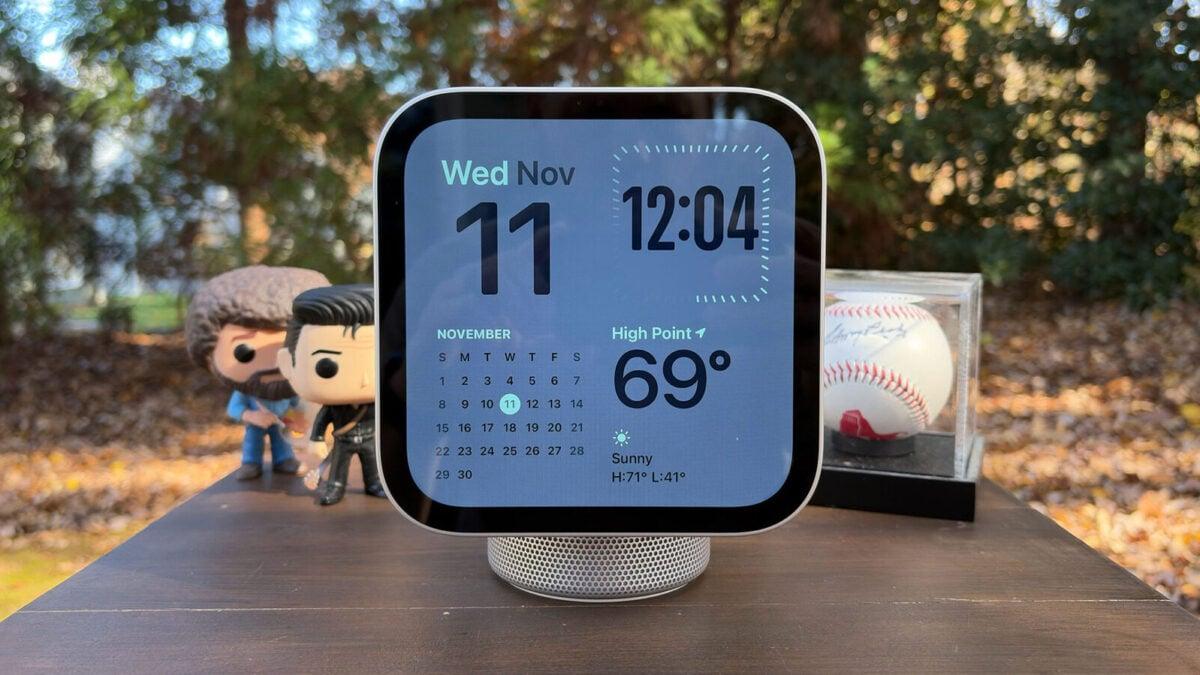
Apple's $299 HomeView smart display, which reaches buyers this week, is a versatile Siri-powered home hub, but only for people who already own an iPhone or an iPad, according to a hands-on review published November 12, 2026.
It is Apple's first smart display. Amazon and Google have sold rival screens for nearly a decade.
Built around your iPhone
Unlike the Amazon and Google devices, the HomeView leans on a companion device. An iPhone or iPad mirrors apps onto the screen using technology similar to CarPlay, Apple's in-car system.
That ties the display's value to how much you use Apple's own apps. The reviewer lists Messages, Calendar, Photos and Reminders. You also need some smart home devices, and you must be willing to use Safari as your recipe box.
Siri needs access to personal data inside some of those apps. If you accept that, the review says the HomeView can quickly become a very versatile device for the whole family.
Screen, sound and design
The tabletop model has a cylindrical, domed base and a 7-inch Liquid Retina display. The wall-mounted version is just the screen, and the mount costs extra.
The IPS panel is LED-backlit and multi-touch, with a 1,088 x 1,088 resolution at 200 pixels per inch. Apple added a fingerprint-resistant coating. An ambient light sensor adjusts brightness and warmth.
Brightness peaks at 500 nits in direct sunlight and drops to 0.3 nits at night. Apple says that is the lowest brightness it has ever offered on a display, and pitches the device for nightstands. The reviewer notes that means a camera pointed at or near your bed.
Every model has two full-range drivers in the display. The base adds a down-firing woofer and a pair of force-canceling passive radiators, so tabletop units deliver fuller sound and more bass than wall-mounted ones.
Limits and extra costs
There are no physical buttons. You control the HomeView with swipes, taps or your voice.
The screen only tilts. You cannot change its height or rotate it, which the reviewer says some buyers will miss. An accelerometer detects the new angle and adjusts the audio from the two drivers.
The only port is a USB-C jack on the back, used for power. The standard version ships with a USB-C cable and a 30-watt adapter.
Wall-mount buyers must purchase the adapter separately. Apple sells a 40W dynamic adapter, up to 60W at maximum, for $39. The minimum required 20W supply costs $19.