Thousands of Gamers Face Downloading GTA 6 for a Week or More
Broadband Genie says 870,000 UK gamers could wait a full week to pre-load Grand Theft Auto VI, which is up to 212GB. Newport is the worst-hit city, and the firm has shared five tips to speed up the download.
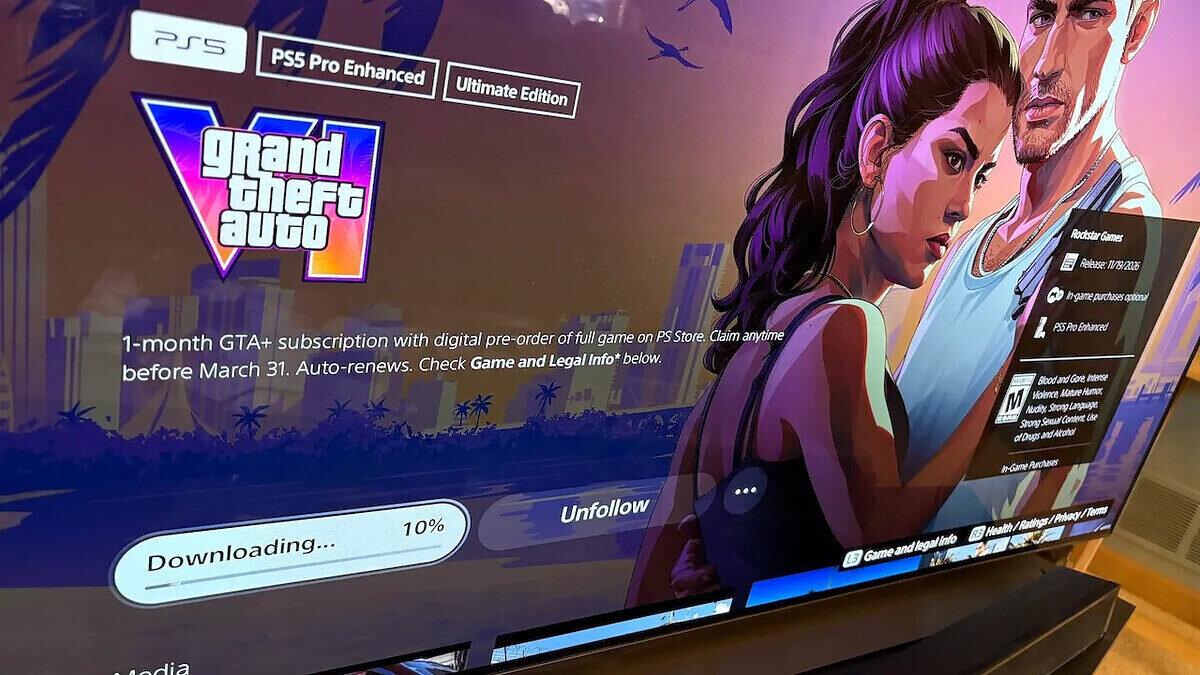
Thousands of gamers face downloading Grand Theft Auto VI for a week or more, according to Broadband Genie, a UK broadband comparison service. The firm estimates that 870,000 UK gamers could be waiting the full week to pre-load the game.
The game comes in at up to 212GB. Players on PlayStation 5 and Xbox have been using the pre-load option up to a week ahead of release, and launch is only a few days away.
What the study found
Broadband Genie analyzed data from more than 17,000 recent speed tests run through its own comparison tool. It calculated that a connection of 2.8Mbps or under needs a week of downloading. A home reaching 9.8Mbps still waits two days.
Newport ranked as the worst-hit city. Over a third of speed tests there (35%) fell below 2.8Mbps, and 41% stayed under 9.8Mbps.
Ely (24%), Hereford (17%) and Bath (16%) also face two days of downloading. In Torquay and Bangor, 9% of gamers are expected to wait a week or more.
The download could squeeze the rest of the home network too. Working from home or streaming video may suffer while the console pulls the file.
Broadband Genie's advice
Alex Tofts, a strategist at Broadband Genie, said the pre-load system has limits. "The pre-load window is meant to guarantee day-one access, but it simply won't save everyone," he said.
He added that "no one wants to find themselves stranded a full week behind other players." Slow speeds, he said, can come from factors outside a provider's control.
Tofts offered several practical fixes:
- Log into the router and enable the faster 5 GHz frequency.
- Remove unrecognized devices from the router's connection list.
- Switch off or disconnect idle phones, smart TVs, laptops and tablets, so all bandwidth goes to the console.
- Swap the provider's default DNS server for a fast public one, such as Google Public DNS, in the console's network settings. He said the default server may be congested.
- Turn on the console's sleep or rest mode so downloads continue, and connect by Ethernet cable for steadier speeds.
Both Xbox and PS5 consoles have a rest mode that lets downloads continue. Players who have already started the pre-load can apply the router and console changes right now.
 Take the quizWhat Kind of Holiday Spender Are You? Take the Black Friday QuizStart →
- 1Column: 4 Reasons to Eat Dark Chocolate, Dietitians Say

- 2Mavericks Surfers Race to California for Waves Near 50 Feet

- 3Chrissie Swan, 52, Tears Up Over Secret Surprise While Recovering

- 4Meghan Markle Plans US Return to See Mother After Father’s Arrest

- 5Aspyn Ovard Reveals Daughter Has Terminal Cancer on Mormon Wives

 Lifestyle7 Signs Your Social Battery Is Running Low (and Why You Keep Cancelling Plans)
 Lifestyle · Food & HealthThanksgiving Food Safety: How Long Leftovers Last and the Safe Turkey Temperature
 Lifestyle7 Quiet Habits of Emotionally Intelligent People, According to Psychologists
 LifestylePeople Who Don’t Like Celebrating Their Birthday Often Share These 7 Traits