Samsung Expert RAW Adds Burst Mode and f/22 Aperture
Samsung’s redesigned Expert RAW app adds larger controls, customizable shortcuts and new shooting options, including Burst mode and a wider Virtual Aperture range. Early settings also point to video support in development, though recording does not work in the current build.
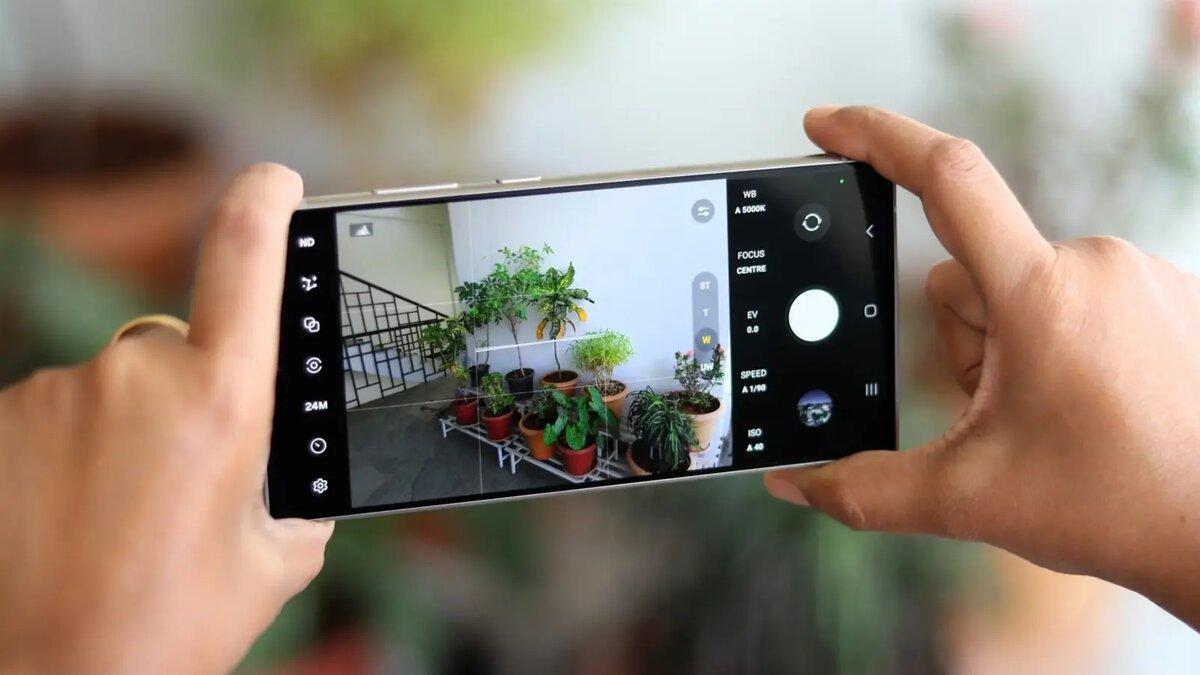
Samsung is giving Expert RAW a major redesign for the Galaxy S27 and One UI 9.5, adding easier-to-reach controls and new shooting features, including Burst mode. The update could make manual photography more flexible for Galaxy users.
The early app version adds a Tint control, photo aspect ratio options and a wider Virtual Aperture range, from f/1.4 to f/22. Samsung has also added signs of video features in development, but recording does not currently work in this build.
More controls within reach
The redesigned interface uses clearer labels and larger adjustment panels for manual settings. The quick controls menu now appears as a multi-row grid, and several menus use more translucent panels.
A selector in the top-left corner opens a grid of shooting tools, including Expert, Virtual Aperture, Virtual Reflector, ND filter and astrophotography. Users can also set the app to reopen in the mode they last used.
Two buttons beside the shutter can be assigned to settings such as exposure lock, picture size, timer, ratio, metering, histogram, focus peaking or autofocus area selection. A new padlock button locks camera settings to help prevent accidental changes.
The histogram now opens into a larger panel with separate white, red, green and blue plots. The expanded view gives photographers more detail than the compact graph overlay.
Burst mode captures up to 30 shots
The new dedicated Burst mode can capture up to 30 shots in a session and save them in DNG format, which preserves RAW files for editing. The app warns that the photos use more storage.
Virtual Aperture simulates changes to depth of field and background blur through software. The new range reaches f/22, compared with a maximum of f/16 on the Galaxy S26 Ultra.
Samsung has added a Tint adjustment alongside white balance, which currently offers manual temperature adjustment. The app also gains options to change the aspect ratio for photos.
Video controls appear in early build
Expert RAW does not currently record video. The early version includes a Videos section in settings with a stabilization toggle, while Ocean mode offers controls for video resolution and frame rate.
Those settings indicate video-related development, but the supported recording modes and resolutions remain unclear. Video capture does not work in the build, and Samsung may continue changing the app as it develops Expert RAW for the Galaxy S27 series and One UI 9.5.
 Take the quizWhat Kind of Holiday Spender Are You? Take the Black Friday QuizStart →
- 1I’m A Celebrity 2026 Line-Up: Rooney Leads 11 Stars Into Jungle

- 2Mavericks Surfers Race to California for Waves Near 50 Feet
- 3NYC Medical Examiner Has Not Determined Cause of Death of Beau Rose Jessup

- 4Mountaineer Finds Ice Age Cave Bear Graveyard in the Dolomites
- 5Rugby League World Cup Final 2026: Kick-Off Times and How to Watch Kangaroos v New Zealand

 Lifestyle7 Signs Your Social Battery Is Running Low (and Why You Keep Cancelling Plans)
 Lifestyle · Food & HealthThanksgiving Food Safety: How Long Leftovers Last and the Safe Turkey Temperature
 Lifestyle7 Quiet Habits of Emotionally Intelligent People, According to Psychologists
 LifestylePeople Who Don’t Like Celebrating Their Birthday Often Share These 7 Traits