Apple Watch Automatically Identifies Songs in Smart Stack
Apple Watch Series 12 and Ultra 4 can show nearby song titles and artists in the Smart Stack through Music Recognition. The feature uses Shazam and requires a…
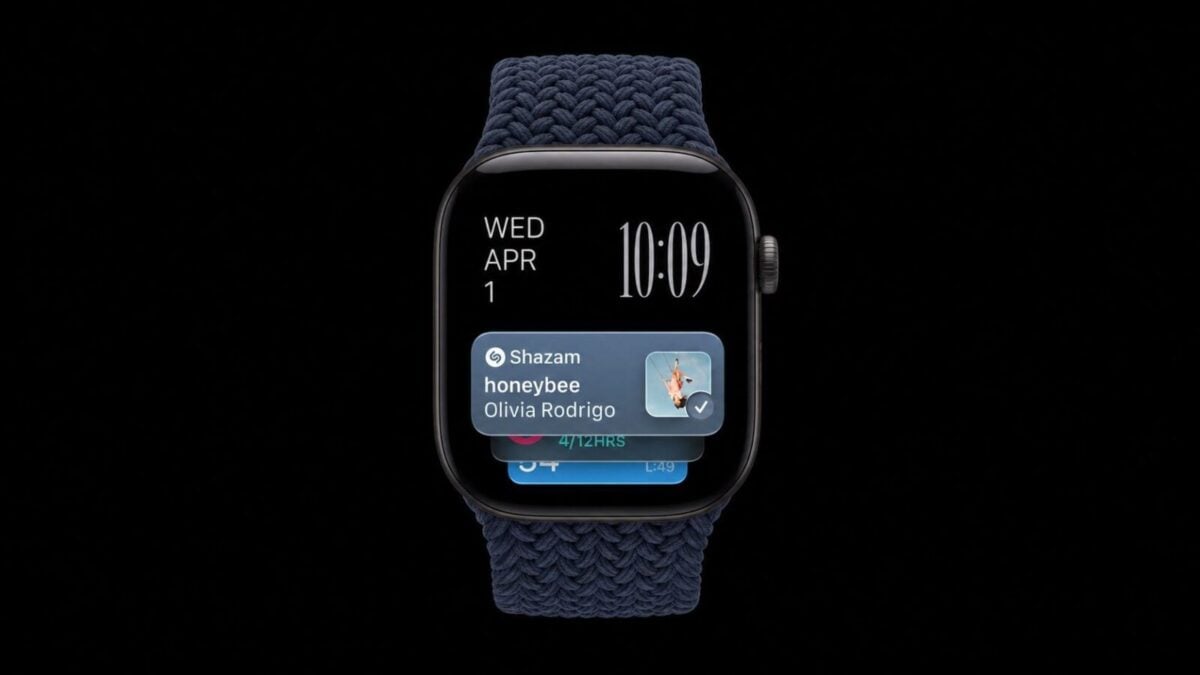
Apple Watch automatically identifies nearby songs and displays their titles and artists in the Smart Stack on Series 12 and Ultra 4 models, using Music Recognition in iOS 27. The feature relies on Shazam and works when music is audible around the wearer, without opening the app or tapping the watch.
That puts a song’s name within reach when it plays in a cafe, shop or car. Users can open the Smart Stack by swiping up from the watch face or turning the Digital Crown upward, then save a recognized track to Shazam history or an Apple Music library with a tap.
It is not a running log of every song the watch hears. The feature works on demand, despite its automatic identification, and the Music Recognition widget must be accessed to see the result.
Which Apple Watch models support automatic music recognition?
Automatic Music Recognition is limited to Apple Watch Series 12 and Apple Watch Ultra 4 paired with an iPhone 11 or later, or an iPhone SE (2nd generation) or later, running iOS 27.
When the Music Recognition widget first appears in the Smart Stack, users can tap “Enable Music Detection” to switch it on. If it does not start working automatically, Apple Watch settings provide a manual route: open Settings, tap Smart Stack, then turn on Music Detection.
Older Apple Watch models can still identify songs through the Music Recognition app, but they do not get the automatic Smart Stack version. That distinction matters for people expecting the feature to work in the background without opening any watch interface.
What happens to audio during identification?
Apple says it does not record or store audio while identifying songs. The watch processes audio in a protected buffer inside its Secure Exclave, then sends an acoustic signature to Shazam’s servers. Apple says that signature cannot be reversed into the original audio.
The feature’s usefulness comes with a clear boundary: the song must be audible nearby, and users still need to check the Smart Stack to see what the watch recognized. Apple’s account of the process also distinguishes the audio itself from the signature sent for identification.
Music Recognition is one of four audio features in Apple’s Audio Intelligence set. The others listed are Sound Recognition, Live Rewind and Siri Recap. Sound Recognition can alert people who are deaf or hard of hearing to sounds including a crying baby, barking dog or doorbell; users enable it on an iPhone through Settings, Accessibility, Sound and Name Recognition.
The newer Live Rewind and Siri Recap features were described as available in beta. Live Rewind can show a text snippet of the previous 15 seconds after a double-click of the Digital Crown. If the user does not act on the snippet, it disappears; older audio is continuously replaced and deleted.
Siri Recap can listen in the background when enabled and create summaries and key points from conversations. Users can save its notes in the Siri app and export them to Notes or Journal, or delete them. Recaps are automatically deleted after seven days if left untouched.
Both newer features are opt-in. Live Rewind requires a manual activation, while Siri Recap can be customized to listen at all times or follow a schedule.