Microsoft Lets Windows Apps Block PCs That Fail Security Check
Microsoft is testing a Windows 11 security check that lets app developers decide how to respond when a PC fails. Apps could display a warning, restrict features or refuse to run. Adobe, Battle.net, 1Password and Schoolyear are testing the feature.
Microsoft is testing a Windows 11 security check that could let apps refuse to run on PCs that fail it, with general availability planned for 2027.
Developers will make the call. They can allow an app to run, show a warning, restrict features or block it.
Windows baseline protection is in preview for Windows Insiders. It combines checks on eight existing security features, including Secure Boot and Memory Integrity, into a result apps can use.
Adobe, Battle.net, 1Password and Schoolyear are testing the check. They have not said they will block PCs that fail it.
Developers choose how apps respond
Some apps already run their own security checks. Microsoft said a banking app might look for a security processor, while a game’s anti-cheat system might check driver signatures.
The new feature gives developers a shared way to check a PC’s security state. Apps can receive a yes-or-no result, a list of missing protections or a hardware-backed verification token checked on a developer’s servers.
Brandon Bray, Microsoft’s principal group product manager for Windows, said: “The platform reports the state; you own the policy.”
Battle.net Vice President of Engineering John Yaney said the check helps Blizzard raise its security standards while keeping friction low for players.
Schoolyear uses the check to confirm whether a student’s PC meets the standard before an exam, said lead security engineer Gergely Homonnai.
Windows settings show missing protections
A PC will fail the baseline check if Secure Boot or Memory Integrity is turned off. Windows leaves Memory Integrity off when a user has disabled it.
The check also covers protections against malicious code in protected parts of Windows and against tools that bypass Windows security. It checks whether drivers meet Windows signing rules.
Windows checks the security state at startup. Microsoft plans to raise the requirements with each version of the baseline.
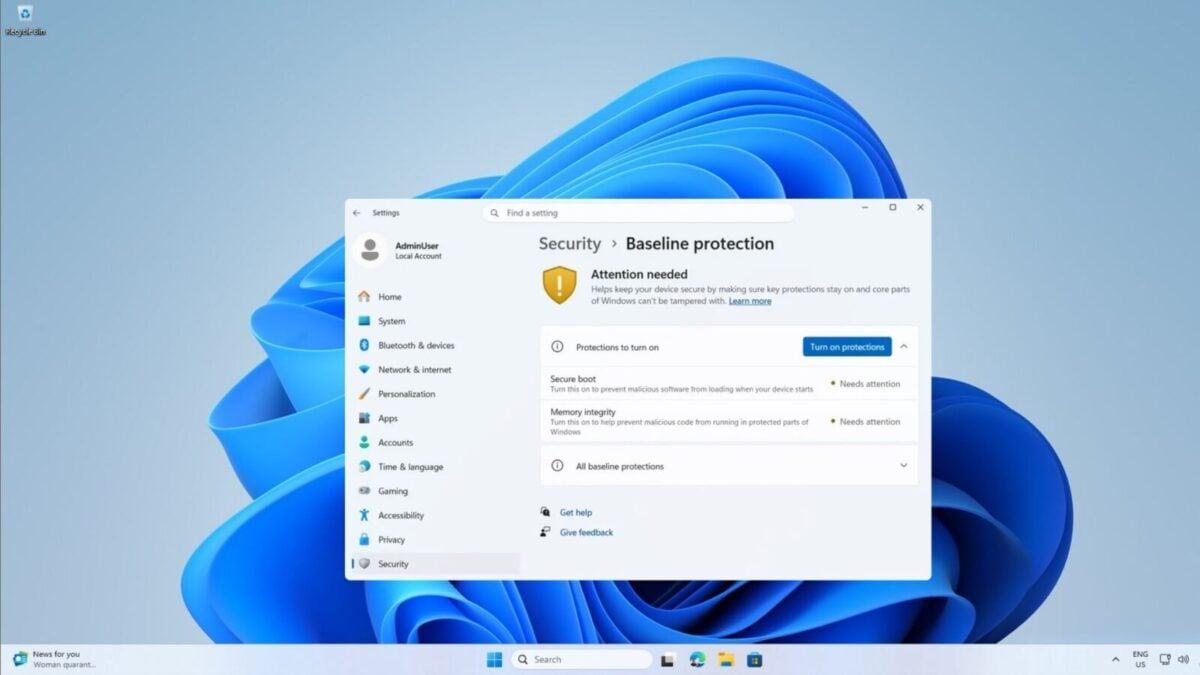
A new Security page in Windows 11 Settings shows which protections are missing. Users can find it under Settings > Security > Baseline protection.
A button can turn on protections that Windows can enable, followed by a restart. Secure Boot requires a separate setup in the computer’s firmware, the software that starts the PC.
Windows offers an advanced restart and a QR code for Secure Boot instructions. On work PCs, an IT administrator may control the relevant settings.
 Take the quizWhat Kind of Holiday Spender Are You? Take the Black Friday QuizStart →
- 1U.S. Emergency Alert Test Nov. 17 Is Not a Power Outage

- 2Gold Silver Price November: Futures Rise Near Yearly Lows

- 3Michael Clarke Says Sandpapergate Scars Drew Steve Smith to New York

- 42027 NFL Mock Draft Puts Ohio State’s Jeremiah Smith at No. 1

- 5GTA 6 New Zealand Time Trick Is Not Guaranteed to Work

 Lifestyle · Food & Health4 Reasons to Eat Oatmeal, According to Nutrition Experts
 Lifestyle7 Signs Your Social Battery Is Running Low (and Why You Keep Cancelling Plans)
 Lifestyle · Food & HealthThanksgiving Food Safety: How Long Leftovers Last and the Safe Turkey Temperature
 Lifestyle7 Quiet Habits of Emotionally Intelligent People, According to Psychologists