Windows 11’s Last Big Update Adds Actions to Search
Microsoft’s optional Windows 11 update puts settings and phone actions directly in Search, alongside a redesigned results list. The release also changes facial sign-in, accessibility tools and gaming controls, although many features will reach PCs gradually.
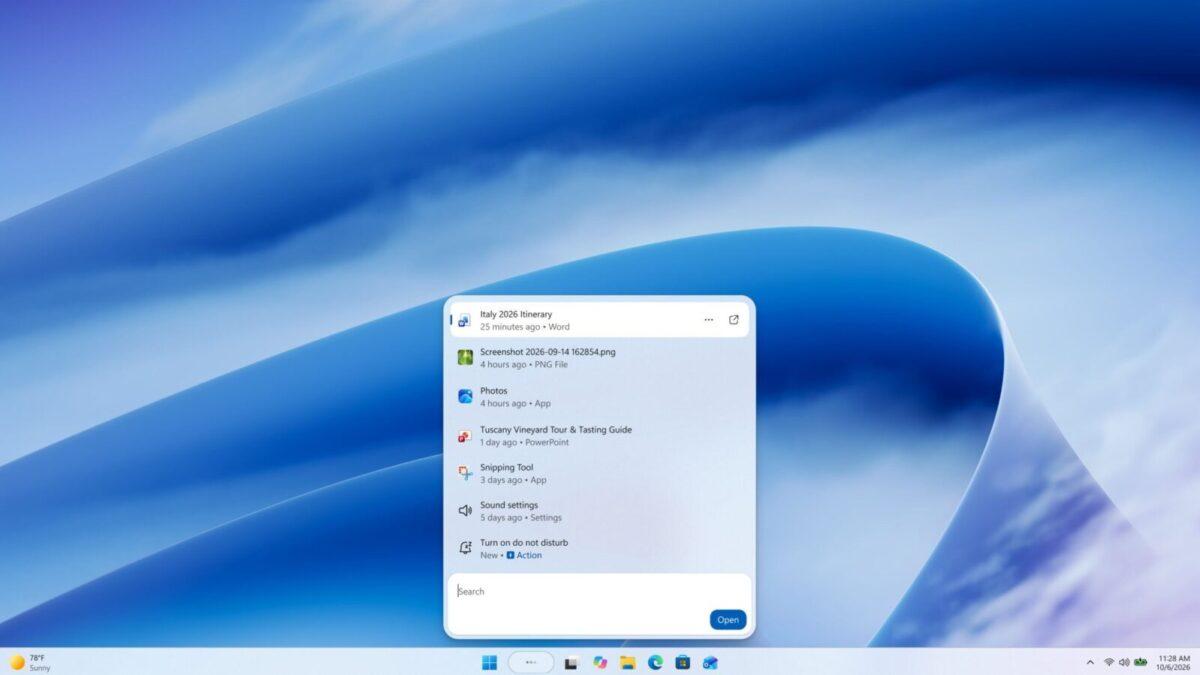
Microsoft has released Windows 11’s last big update of 2026, adding a redesigned Search experience and actions users can perform without opening Settings. The optional KB5132057 update also changes facial sign-in and accessibility tools, though many features will reach PCs gradually.
Users can install the non-security update through the Windows 11 Settings app or wait for its December Patch Tuesday rollout. Installing it immediately does not guarantee that every new feature will appear right away.
Search gains actions and previews
Windows Search now presents results in a single list and can perform tasks such as turning on dark mode or Bluetooth. Users can also adjust brightness, mute their device and arrange open windows directly from Search.
People with an Android phone connected through Phone Link can call or text contacts from Search. They can also use phone actions to find their device or enable Do Not Disturb.
Search results include file previews and details such as where a file is saved, who created it and when it was last modified. The update also improves recognition of typos and synonyms.
Quick answers for weather, stocks and factual queries can appear without leaving Search. The redesigned experience is initially available in English.
File Explorer search from This PC also uses an index, a system that organizes file information for faster searching. The change makes it more consistent with searches from File Explorer Home.
Sign-in and accessibility tools change
Windows Hello facial recognition can temporarily brighten the screen to help users sign in in dim rooms. The option is available under Settings, Accounts, Sign-in options and Facial recognition.
A new pointer indicator helps people with low vision locate their mouse pointer. Users can enable it under Accessibility settings, then toggle it with Windows logo key + Ctrl + Shift + X.
Live captions can transcribe system audio, microphone audio or both. Narrator also gains support for reading math in Greek, Hungarian, Indonesian, Norwegian (Bokmål), Polish, Russian, Swedish and Vietnamese.
The update changes the border shown during screen capture from yellow to red. It also lets users turn off accidentally triggered Sticky Keys, Filter Keys or Toggle Keys shortcuts directly from the prompt.
Gaming controls and rollout
In XBOX mode, Gaming Task View gains access to the full set of Windows Quick settings without leaving the mode. The update also redesigns the Run dialog, which users can enable under Settings, System and Advanced.
Windows can notify users when an installed app offers a new widget. Selecting the notification opens the Widgets Board and highlights the widget.
Microsoft is slowing updates over the holiday season. There will be no non-security preview update in the second part of November or in December, and the normal update cycle resumes in January 2027.
 Take the quizWhat Kind of Holiday Spender Are You? Take the Black Friday QuizStart →
- 1Stock Market Today: Dow Slides 1.34% and VIX Jumps 15% at Midday

- 2Joachim Klement to Sell Stocks After S&P 500 Signal

- 3Stock Market Today: Nasdaq, S&P 500 Futures Slide as AI Selloff Deepens

- 4Kenneth Walker’s Groin Injury Puts Cardinals Game in Doubt

- 5Pat Cummins Faces Captaincy Doubts From Mitchell Johnson

 Markets · FintechHow to Calculate Compound Interest: Formula, Examples and the Rule of 72
 Lifestyle · Food & HealthNormal Blood Pressure Chart by Age: Healthy Ranges Explained
 Lifestyle · Food & HealthWhat Is Raynaud’s Syndrome? Why Fingers Turn White in the Cold
 Lifestyle · Food & Health4 Ways Walking After Meals Helps Your Body, Doctors Say