Tesla FSD V15 Rolls Out With Tap-to-Go Display
Tesla’s Full Self-Driving V15 is rolling out with a redesigned view of the road and a tap-to-go navigation feature. The update also changes parking suggestions and route planning, while letting drivers switch between the new visualization and a conventional map.
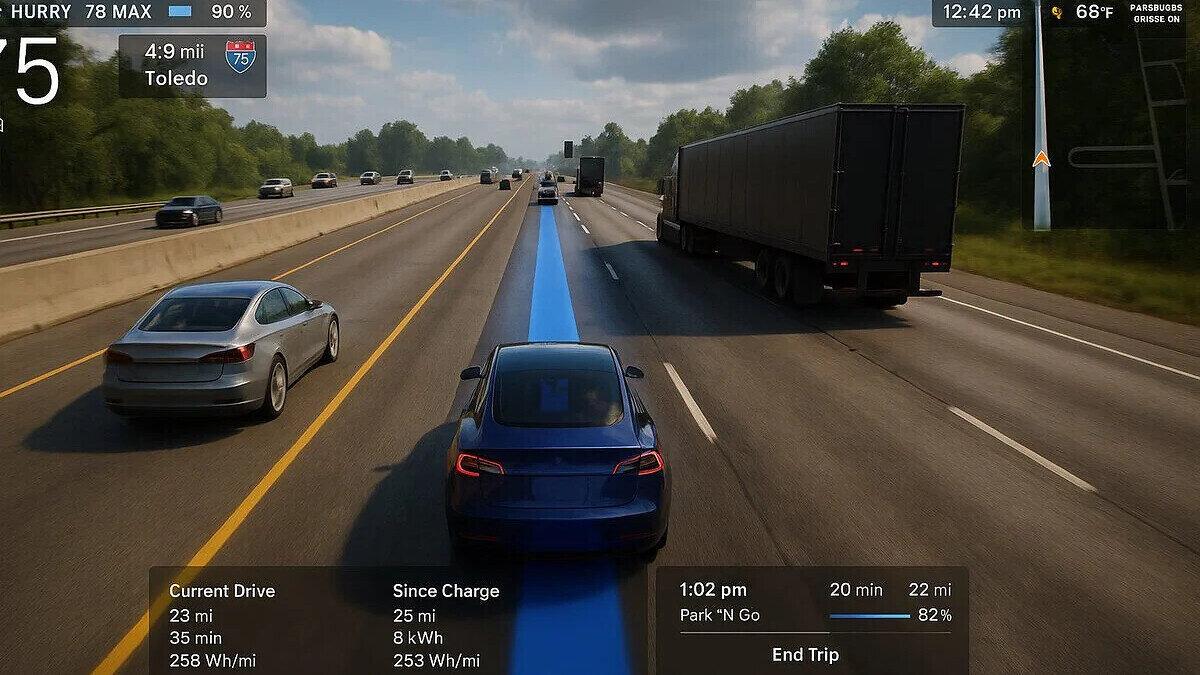
Tesla’s Full Self-Driving V15 is rolling out with a redesigned display that lets drivers tap a point on the screen to direct the car there. The update also adds parking suggestions and a new approach to route planning.
The display, called Tesla Reality View, uses camera feeds to render the vehicle’s surroundings. Drivers can see upcoming turns within that scene rather than relying solely on a map.
Tesla describes the feature as a real-time visualization with a virtual overhead view of the vehicle. Drivers can choose a full-screen visualization, a map or a split-screen layout, and swipe between Reality View and the classic map.
Reality View adds tap-to-go controls
Reality View displays arrows for upcoming navigation turns and adds turn-signal indicators to the rendered scene. A bird’s-eye perspective shows the vehicle’s surroundings, while the tap-to-go feature lets drivers select a destination point on the visualization.
Tesla CEO Elon Musk said the computer “re-renders reality with chevrons in the sky for turns like a video game.” He said drivers can tap a point on the display to make the car go there.
The update also makes turn signals quieter. Their sound fades after a few clicks, and a quiet mode is available through a moon icon at the bottom left of the display.
Parking and navigation get updates
V15 shows multiple parking options at a destination and remembers a driver’s parking history to prioritize preferred spots. Navigation uses a model trained on fleet route-preference data to help choose routes.
Tesla said the update delivers a 25x improvement in handling safety-critical cases across its driving network. Tesla’s vice president of AI also said the new augmented-reality view uses less computing power than the original FSD visualization.
Owners can check their hardware
V15 is compatible with Tesla’s Hardware 4, also called AI4. Tesla has not confirmed a V15 build for Hardware 3.
Owners can check their car’s Autopilot computer under Controls, then Software and Additional Vehicle Information. A compatible entry will show AI4 or Full Self-Driving Computer (AI4).
Drivers can check their Full Self-Driving subscription or purchase under Controls and Upgrades. The update requires an active subscription or purchase; Autopilot alone does not include the new interface.
Under Controls, Software and Software Update Preference, owners can select Advanced for the earliest available release channel for their region and hardware.
 Take the quizWhat Kind of Holiday Spender Are You? Take the Black Friday QuizStart →



 Markets · FintechHow to Calculate Compound Interest: Formula, Examples and the Rule of 72
 Lifestyle · Food & HealthNormal Blood Pressure Chart by Age: Healthy Ranges Explained
 Lifestyle · Food & HealthWhat Is Raynaud’s Syndrome? Why Fingers Turn White in the Cold
 Lifestyle · Food & Health4 Ways Walking After Meals Helps Your Body, Doctors Say