How to Register for PKH 2026 Online via the Cek Bansos App
Register for PKH 2026 online through the Cek Bansos app. Check the requirements, documents, and step-by-step process on your phone.
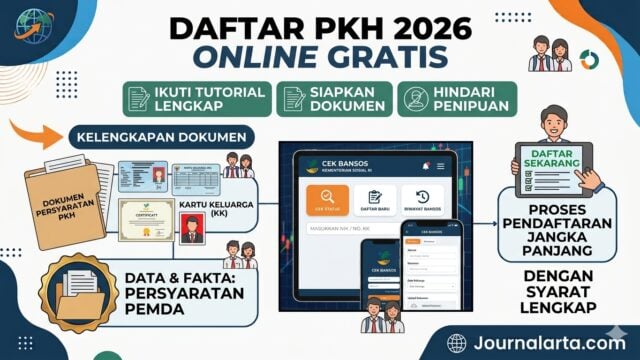
JAKARTA, JOURNALARTA.COM – The Family Hope Program (PKH) is one of the main social assistance schemes from the Ministry of Social Affairs (Kemensos) for low-income and vulnerable families. Registration no longer has to be done in person at a village or subdistrict office, and applicants do not need to use a middleman.
Kemensos has opened online registration through the official "Cek Bansos" app. The process is simple, free, and takes around 10 minutes if all requirements are ready. Here is the complete guide based on the official rules.
Latest PKH 2026 Registration Requirements
To have the application processed and a chance of being accepted, applicants must meet three main requirements set by Kemensos:
1. Indonesian citizen with official identity
Must be an Indonesian citizen and have a Population Identification Number (NIK) that is registered and valid in the Civil Registration Office (Dukcapil) system. The NIK, full name, and date of birth must match between the identity card (KTP) and family card (KK).
2. Classified as a vulnerable poor family and have PKH components
The family must fall into the low-welfare category and have one or more of the following PKH recipient components:
- Pregnant or breastfeeding mother
- Children aged 0 to 21 who are still in school
- Elderly aged 70 and above
- Persons with severe disabilities
3. Not receiving a similar aid twice
Applicants may still register if they currently receive other assistance such as the Non-Cash Food Assistance (BPNT). However, if they are already listed as PKH beneficiaries, they cannot register again or receive duplicate aid.
Note: Not having a Family Prosperity Card (KKS) is not a mandatory requirement. The card will be issued later if the registration passes verification.
Documents You Need to Prepare
Before filling out the online form, prepare the following documents in JPG or PDF format, with a maximum size of 2 MB per file to avoid upload failure:
1. A clear, unblurred photo of the applicant’s original KTP
2. A photo of the front page and all family members listed on the KK
3. A photo of the front of the house and the interior condition of the home
4. Supporting documents according to the component applied for: a pregnancy certificate from a midwife/doctor, a child’s report card, or a disability certificate from an authorized institution
How to Register for PKH 2026 Through the Cek Bansos App
Follow these official steps:
1. Download the official app
Open Google Play Store, search for and download the app called "Cek Bansos." Make sure the developer is the Ministry of Social Affairs of the Republic of Indonesia and that it has the official Kemensos logo to avoid fake apps.
2. Create a user account
Open the app and select the registration menu. Fill in complete data including NIK, family card number, active email address, and reachable phone number. Enter the verification code (OTP) sent via SMS or email.
3. Open the registration menu
After successfully logging in, select the "Daftar Usulan" menu.
4. Add a new submission
Click the "Tambah Usulan" button, then select the aid type you are applying for: "Program Keluarga Harapan (PKH)."
5. Fill in personal data
Basic data such as NIK will be filled in automatically. Complete the home address as listed on the family card.
6. Upload supporting documents
Upload all prepared documents one by one in the available fields. Make sure the images are clear.
7. Submit the application
Check the box confirming the accuracy of the data, then click "Tambah Usulan."
8. Finish
The application is successfully submitted and the status will change to "Menunggu Verifikasi Dinas Sosial". Save proof of registration by taking a screenshot.
Verification Time and How to Check Status
After submission, the data will go through several review stages with the following estimated timeline:
1. Village/Subdistrict Verification: Takes 1–2 weeks. Officers will conduct a direct check at the applicant’s home.
2. Regency/City Social Affairs Office Verification: Takes around 1–2 months. The data will be matched again with the Dukcapil database.
3. Final Kemensos Verification: If found eligible, the data will be entered into the National Socioeconomic Single Data (DTSEN) and will wait for quota allocation and fund disbursement.
How to monitor status:
Open the Cek Bansos app again and go to the "Status Pendaftaran" menu. If it says "Lolos," it means the data has been included in the beneficiary list and you only need to wait for the aid disbursement schedule.
3 Common Reasons Applications Are Rejected
If the application fails or is rejected, it is usually caused by one of the following:
1. Data does not match: The NIK or population data does not match the Dukcapil record. The solution is to correct the data first at the Civil Registration Office.
2. Poor document quality: Photos are blurry, cropped, or do not reflect the real condition. Reapply with clearer images.
3. Does not meet the category: The family does not have a recipient component such as school-age children, pregnant women, elderly members, or persons with disabilities. PKH is specifically intended for families with these components.
Important Warning: Registration is 100% Free
Remember that PKH registration is completely free. There is no such thing as administrative fees, "expedited processing" money, or payment for services to speed up the process.
If anyone claims they can get the registration approved in exchange for money, that person is a broker and a scammer. Report them immediately to Kemensos complaint service at 171 or through the official channels listed on kemensos.go.id.
Conclusion:
With this online system, registration is faster, more transparent, and can be accessed independently by anyone. There is no need to queue for hours or depend on others. Make sure the data entered is correct and complete so the chances of approval are higher.
Source: Official Registration Guide for the Cek Bansos App, Ministry of Social Affairs of the Republic of Indonesia, June 2026
Frequently Asked Questions
Q: Do I need a KKS to register?
A: No, the KKS will be issued if the registration passes verification.
Q: Can I register using someone else’s phone?
A: Yes, as long as the data entered belongs to the applicant and the uploaded documents are original.
Q: How long until the funds are disbursed after approval?
A: Usually it follows Kemensos’ aid disbursement schedule, on average every 2–3 months.
Q: Can I register if I already receive BPNT?
A: Yes, because both are different forms of aid and do not replace each other.